
Range Filter
Overview
The Range Filter allows you to filter the collection by using an HTML range field.
Ideal for
This filter is especially useful for entries that contain numeric values, such as those in an integer field.
Options
You can set the min, max and step values as well as a default value that sets the default value of the range slider.
Default value caveat
If there is a preset condition specified in the livewire-collection tag, it will override the default value set using the filter's default property.
Syntax
{{ livewire:lf-range-filter
    blueprint="cars.car"
    field="seats"
    condition="gte"
    min="2"
    max="9"
    default="2"
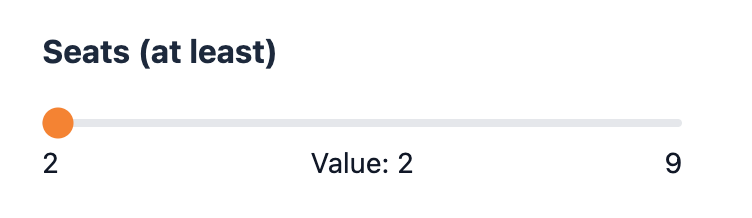
}}
Dynamic bounds
With enable_dynamic_range_bounds turned on in the config file, the slider narrows to the lowest and highest values among the entries that still match the other active filters, instead of always spanning min to max. It's off by default.
'enable_dynamic_range_bounds' => true,The bounds are calculated the same way as for the Dual Range Filter, including the rounding to step, the extra step for gt and lt, and the fallback to min and max. See How the bounds are calculated, and Performance for the cost of the extra queries.
On the Range Filter:
- Before the filter is used, the handle follows the bounds: it moves to the
defaultvalue (ormin), kept within the new range. This doesn't apply a filter. - Once the user moves the handle, changing the other filters never moves it. If the matching entries no longer reach the selected value, the bounds widen to include it.
- Moving the handle back to the default, or to where the default sits within the narrowed range, clears the filter, as long as that position doesn't exclude any matching entries.
- When every matching entry has the same value, the bounds collapse to that value and the slider is disabled until the other filters leave room again. A slider with an active selection is never disabled: if it has no room to move, it shows the full
min–maxinstead.
Custom views
The lf-range.blade.php view changed in v4.6.0. If you published it before that, re-publish it or merge in the changes below, otherwise the slider won't follow the bounds. The input takes its min and max from $dynamicMin and $dynamicMax (falling back to $min and $max), $boundsDisabled disables it, and a listener for the range-bounds-updated event keeps the displayed value in sync. This is the full default view:
<div>
    <div
        class="grid grid-cols-1 gap-y-4"
        x-data="{
            init() {
                // Only the display syncs; the true selection is preserved server-side.
                // Bounds go first so the value isn't clamped to the old range.
                $wire.on('range-bounds-updated', (bounds) => {
                    $refs.range.min = bounds.min;
                    $refs.range.max = bounds.max;
                    $refs.range.value = bounds.selected;
                    $refs.selectedValue.textContent = bounds.selected;
                });
            }
        }"
    >
        <div class="relative mb-3">
            <input
                id="{{ $field }}"
                type="range"
                x-ref="range"
                min="{{ $dynamicMin ?? $min }}"
                max="{{ $dynamicMax ?? $max }}"
                step="{{ $step }}"
                class="w-full h-1 mb-6 bg-gray-200 rounded-lf appearance-none cursor-pointer"
                wire:model.live="selected"
                @disabled($boundsDisabled)
            >
            <span class="text-sm text-lf-text absolute start-0 -bottom-1">{{ $dynamicMin ?? $min }}</span>
            <span class="text-sm text-lf-text absolute left-1/2 -translate-x-1/2 -bottom-1">{{ __('statamic-livewire-filters::ui.value') }}: <span x-ref="selectedValue">{{ $selected }}</span></span>
            <span class="text-sm text-lf-text absolute end-0 -bottom-1">{{ $dynamicMax ?? $max }}</span>
        </div>
    </div>
</div>
The event's payload has min, max, selected and disabled. See Custom views on the Dual Range Filter page for details.