
DualRangeFilter
Overview
The Dual Range Filter allows you to filter the collection by a range of min and max values using a custom noUiSlider range slider.
Ideal for
Any situation that you want to let the user select a range of values, for example an integer field, pricing fields or even dates.
Javascript
This field uses the noUiSlider Javascript range slider so you need to include it in order for this field to work. Visit the installation page to learn more.
Options
You can set the following options:
- min: The minimum allowed value
- max: The maximum allowed value
- step: The steps that the value of each handle will change between when moved. (Default: 1)
- minRange: The minimum allowed distance between the handles (Default: 1)
- format: By default the range slider uses integer values. You can set this to float to enable more accuracy if needed.
- modifier: This filter uses by default the
gteandlteconditions for numbers and theis_afterandis_beforeconditions for date fields. You can pass a pipe separated modifier in order to change that, for examplegt|lt.
Syntax
{{ livewire:lf-dual-range-filter
    blueprint="cars.car"
    field="date_of_registration"
    min="2019"
    max="2025"
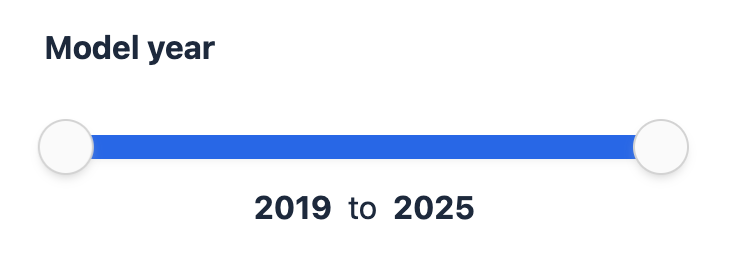
}}
Preset values / Custom URL string
This plugin sets two parameters, one for the minimum value and one for the maximum value. You can preset one or both of those values in the LivewireCollection component by using the original conditions:
{{ livewire-collection:cars max_passengers:gte="4" max_passengers:lte="7" }}Similarly, you need to set both those conditions in the config file for the custom URL query string to work correctly.
Usage with Date fields
As you can see in the example page, this slider can also tackle date fields. When the date field is detected, the conditions automatically change to is_after and is_before. A typical use case is to let the user select a range of years to filter out the entries based on a date field.
Note that the minimum date is set to the start of the year selected and the ending date to the end of the year selected.
Dynamic bounds
By default the slider always spans the min and max set on the tag, even when the other filters leave only a few entries. With dynamic bounds turned on, it narrows to the lowest and highest values among the entries that still match the other active filters. If a user picks a brand whose cars have 4 to 7 seats, a seats slider set up from 2 to 9 shrinks to 4–7, so it doesn't offer values that return no results.
Turn it on in the config file:
'enable_dynamic_range_bounds' => true,It's off by default and applies to both the Dual Range Filter and the Range Filter.
Published views
The sliders get their new bounds through a range-bounds-updated event that the filter views listen for since v4.6.0. If you published lf-dual-range.blade.php or lf-range.blade.php before that, add the listener (see Custom views) or re-publish the views, otherwise the sliders won't change.
How the bounds are calculated
- Only the other filters count. Conditions on the slider's own field are left out, so moving the handles doesn't shrink the slider under them. Parameters set on the
{{ livewire-collection }}tag (such asstatusor a query scope) do count, so the bounds match the entries the tag can show. If the tag uses several collections, matching entries from all of them count. - Rounded to the step. The bounds are rounded outwards to the slider's
step, counting frommin, so the handles always land on a valid value. Withmin="0"andstep="5", matching values from 12 to 38 give a slider from 10 to 40. - One extra step for strict conditions. With a strict modifier like
gt|lt, a bound moves one more step out where needed, so that with the handles at the ends every matching entry is still included. - Never past
minandmax. The bounds stay within theminandmaxset on the tag. If no entries match the other filters, or all their values fall outsidemin–max, the slider shows the fullmin–maxagain. - Can't be changed from the browser. The collection sends the filter state for the bounds encrypted and tied to its collections, and the filters ignore anything else. A crafted request can't make the slider reveal values from entries the tag doesn't show, such as drafts.
The first bounds are calculated right after the page loads, so the slider shows the full min–max for a moment before it narrows.
Selections
While the filter isn't in use, the handles follow the bounds and sit at the new minimum and maximum. This only moves the handles: it doesn't apply a filter or add a tag.
Once the user moves a handle, changing the other filters never moves the selection. If the matching entries no longer reach the selected values, the bounds widen to include them. For example, with 5 to 10 seats selected and the other filters matching cars with 4 to 6 seats, the slider spans 4 to 10 and the handles stay at 5 and 10.
Moving the handles back to the ends of the narrowed slider clears the filter, just like moving them back to min and max, as long as the ends don't exclude any matching entries.
Disabled slider
If the filter isn't in use and the bounds are narrower than minRange (with the default minRange of 1, that's when every matching entry has the same value), the slider is disabled. It's still drawn minRange wide, since noUiSlider can't show a narrower range. It's enabled again as soon as the other filters leave room to move.
A slider with an active selection is never disabled. If the selection and the matching values together leave less than minRange or one step of room, the slider shows the full min–max instead.
Date fields
On a date field the bounds are whole years: the slider narrows to the years of the earliest and latest matching dates. Since is_after and is_before are strict conditions, the bounds can reach one year further so those entries stay included.
Performance
Dynamic bounds run a query for each range filter on the page when it loads and after each filter change, collecting the field's values from the matching entries. Identical queries within the same update are shared, as with the filter value counts. Like enable_filter_values_count, use it with care on very large data sets (1000+ entries).
Custom views
After each bounds update the filter dispatches a range-bounds-updated event with this payload:
| Key | Description |
|---|---|
min | The new lower bound. |
max | The new upper bound. |
selectedMin, selectedMax | Dual Range Filter only: the handle positions. |
selected | Range Filter only: the value to show on the handle. |
disabled | true when the slider should be disabled. |
The noUiSlider element is wire:ignored, so lf-dual-range.blade.php updates it from the event, next to the existing dual-range-preset-values listener:
$wire.on('range-bounds-updated', (bounds) => {
    slider.noUiSlider.updateOptions({
        range: {
            'min': bounds.min,
            'max': bounds.max
        }
    }, false);
    slider.noUiSlider.set([bounds.selectedMin, bounds.selectedMax], false);
    bounds.disabled ? slider.noUiSlider.disable() : slider.noUiSlider.enable();
});
Keep the false arguments: they update the slider without firing its set event, which would send the new positions back to the server as a filter.
For lf-range.blade.php, see Custom views on the Range Filter page.
Styling
We have modified the original CSS file of noUiSlider to better fit with the rest of the filters. If you are using our Javascript bundle as mentioned in the installation page, you can use CSS variables to modify the appearance of the slider. The following variables can be overridden in your CSS file (use !important):
:root {
    --noui-width: 16px;
    --noui-height: 12px;
    --noui-handle-width: 28px;
    --noui-handle-height: 28px;
    --noui-handle-radius: 100%;
    --noui-border-radius: 0;
    --noui-bg: #FAFAFA;
    --noui-bg-dark: #e4e4e4;
    --noui-border: #D3D3D3;
    --noui-shadow-light: #F0F0F0;
    --noui-shadow-dark: #BBB;
    --noui-connect: #2563eb;
    --noui-shadow-active: #DDD;
}